Learn ETL/DWH/BI Report Testing From Industries Experts
ETL/DWH/BI Report Testing Training
Most Comprehensive Course to bring you at expert level from Zero.
When it comes to business intelligence quality assurance, the terms Data Warehouse (DWH) Testing and ETL Testing are often used interchangeably, even though they represent different components of the overall testing process.
A Data Warehouse is a centralized repository that stores an organization’s data, including both historical and real-time data, to support data-driven decision-making. Senior management relies heavily on the data stored in data warehouses for accurate insights, analysis, and forecasting. Therefore, ensuring data quality through rigorous testing is critical to prevent errors that could affect strategic business decisions.
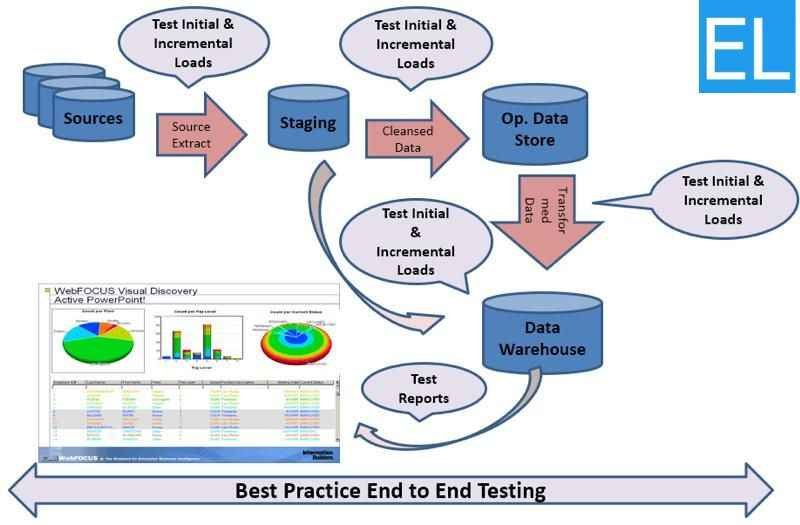
To make sure the data warehouse holds accurate, high-quality data, testing should be performed efficiently, covering the entire process from data extraction to data loading.
ETL Testing (Extract, Transform, Load) is a subset of Data Warehouse Testing. ETL is the process of extracting data from multiple sources, transforming it as per the business and reporting requirements, and loading it into the target data warehouse.
The ETL process is the backbone of data warehousing, as it ensures that the data is prepared and ready for analysis. ETL testing validates this process, ensuring that data is correctly extracted, transformed, and loaded into the data warehouse without any loss, corruption, or errors.
What you'll learn in the course
Master Data Warehousing Concepts, ETL Process, SQL for Data Validation, Testing Data Extraction, Transformation, and Loading.
Build a strong foundation in SQL and master SQL queries to validate data across different testing scenarios.
Learn the ETL process fundamentals, including extracting, transforming, and loading data from multiple sources.
Validate data extraction, transformation, and loading processes to ensure data integrity without loss or corruption.
Gain proficiency in testing data quality and ensuring accuracy, consistency, and completeness in your data warehouse.
Automate ETL and Data Warehouse Testing using industry-standard tools for efficient testing processes.
Test the accuracy and performance of BI reports generated from your data warehouse to ensure real-time updates and accurate insights.
ETL/DWH/BI Report Testing Course Content
🎬 Overview of Data Warehousing Concepts – Understand the architecture and design of data warehouses.
• Key components of data warehouses such as staging, integration, and presentation layers.
• The role of metadata in data warehouses.
🎬 Types of Data Warehouses – Explore various types of data warehouses.
• Enterprise Data Warehouses (EDW) and how they centralize organizational data.
• Operational Data Stores (ODS) – How they differ from traditional data warehouses.
• Data Marts – How they focus on specific areas of business.
🎬 Understanding ETL Process – Learn the ETL process and its significance.
• Key steps: Extraction, Transformation, and Loading, and how they work together.
• Extracting data from various sources like databases, flat files, and APIs.
• Transformation rules, data cleansing, and validation methods.
• Loading data into different destinations such as Data Warehouses or Data Lakes.
🎬 Role of Business Intelligence in Data Warehousing – How BI helps leverage data.
• How data warehouses serve as the foundation for BI tools and reporting.
• Real-time and historical data analysis using BI tools like Power BI, Tableau.
⌨ COURSE CHEAT SHEET DOWNLOAD
🎬 Introduction to SQL and Relational Databases – Basic concepts of SQL and its importance.
• Relational database structure, tables, rows, and columns.
• Data types, primary and foreign keys in relational databases.
🎬 Writing SQL Queries for Data Extraction – Practical SQL querying techniques.
• SELECT statements, filtering data with WHERE clauses.
• Using ORDER BY and GROUP BY for sorting and grouping data.
🎬 SQL Joins for Data Validation – Combining tables for comprehensive validation.
• Understanding INNER JOIN, LEFT JOIN, RIGHT JOIN, and FULL JOIN.
• Practical examples for validating data across multiple tables.
🎬 Data Manipulation with SQL – INSERT, UPDATE, DELETE commands for manipulating data.
• Inserting data into tables for testing purposes.
• Updating existing data to simulate real-time scenarios.
• Deleting unwanted records to ensure data integrity.
🎬 Advanced SQL for Data Transformation – Master advanced SQL features.
• Aggregation functions (SUM, COUNT, AVG) for reporting.
• CASE statements and conditional queries for complex transformations.
🎬 SQL for Data Comparison and Validation – Techniques for validating data.
• Comparing data from source and target systems using SQL queries.
• Using COUNT, GROUP BY, and HAVING clauses for data verification.
✍ Quiz 2: SQL Practical Applications
🎬 Introduction to ETL Testing – Importance of testing in ETL processes.
• Ensuring data accuracy, completeness, and integrity in ETL pipelines.
🎬 Extracting Data from Multiple Sources – Data extraction techniques and challenges.
• Extracting data from structured (databases) and unstructured sources (text files, APIs).
• Validating extracted data for consistency and completeness.
🎬 Validating Data Transformation Rules – Verifying transformation accuracy.
• Testing business rules for transforming data.
• Handling data format changes, and data enrichment during transformation.
🎬 Testing Data Loading into Target Warehouse – Techniques to ensure accurate data loads.
• Verifying data completeness and integrity during the load process.
• Testing incremental and full data loads.
🎬 Common ETL Challenges and Solutions – Tackling ETL-specific challenges.
• Handling large data volumes, slow performance, and scheduling errors.
• Addressing data duplication and missing data during ETL processes.
✍ Quiz 3: ETL Testing Knowledge Check
🎬 Ensuring Data Accuracy, Completeness, and Consistency – Techniques to test data integrity.
• Validating that data is accurate, complete, and consistent across systems.
🎬 Data Profiling Techniques – Profiling data to identify issues.
• Profiling data to identify duplicates, missing values, and outliers.
🎬 Data Cleansing for Data Quality – Methods for cleansing data.
• Standardizing and formatting data to meet data warehouse requirements.
🎬 Identifying and Fixing Data Quality Issues – Troubleshooting data issues in ETL.
• Using tools and scripts to automatically detect and fix data quality problems.
✍ Quiz 4: Data Quality Concepts
🎬 Introduction to Automation in ETL Testing – Benefits of automating ETL testing.
• Automating repetitive ETL tasks to save time and reduce human error.
# tests/conftest.py
import os
import pytest
import psycopg2
import pandas as pd
from sqlalchemy import create_engine

def _get_env(name, default=None):
    return os.environ.get(name, default)

@pytest.fixture(scope="session")
def pg_engine():
    # Example for Postgres - connection details read from env (CI injects them)
    user = _get_env("PG_USER")
    pwd  = _get_env("PG_PASSWORD")
    host = _get_env("PG_HOST", "localhost")
    port = _get_env("PG_PORT", "5432")
    db   = _get_env("PG_DB")
    url = f"postgresql://{user}:{pwd}@{host}:{port}/{db}"
    engine = create_engine(url)
    yield engine
    engine.dispose()

@pytest.fixture
def fetch_df(pg_engine):
    def _fetch(query):
        return pd.read_sql_query(query, pg_engine)
    return _fetch
Example pytest: row count validation
# tests/test_row_count.py
def test_row_count_source_to_target(fetch_df):
    src_q = "SELECT COUNT(*) as cnt FROM source_schema.orders WHERE load_date = CURRENT_DATE"
    tgt_q = "SELECT COUNT(*) as cnt FROM target_schema.orders WHERE load_date = CURRENT_DATE"
    src = fetch_df(src_q)["cnt"].iloc[0]
    tgt = fetch_df(tgt_q)["cnt"].iloc[0]
    assert src == tgt, f"Row count mismatch: src={src} tgt={tgt}"
Example pytest: checksum / hash validation
# tests/test_checksum.py
import hashlib

def _row_checksum(row, cols):
    s = "|".join(str(row[c]) for c in cols)
    return hashlib.md5(s.encode("utf-8")).hexdigest()

def test_checksum_column_level(fetch_df):
    cols = ["id","amount","status"]  # columns to include in checksum
    src_q = "SELECT id, amount, status FROM source_schema.orders WHERE load_date = CURRENT_DATE ORDER BY id"
    tgt_q = "SELECT id, amount, status FROM target_schema.orders WHERE load_date = CURRENT_DATE ORDER BY id"
    src_df = fetch_df(src_q)
    tgt_df = fetch_df(tgt_q)
    assert len(src_df) == len(tgt_df), "Row count mismatch before checksum"
    for i in range(len(src_df)):
        assert _row_checksum(src_df.iloc[i], cols) == _row_checksum(tgt_df.iloc[i], cols)
Example pytest: transformation/business rule
# tests/test_transformations.py
def test_amount_positive(fetch_df):
    q = "SELECT amount FROM target_schema.orders WHERE load_date = CURRENT_DATE AND amount < 0 LIMIT 1"
    df = fetch_df(q)
    assert df.empty, f"Found negative amounts: {len(df)} rows"
Run tests locally
Install dependencies and run pytest with HTML report generation:
 Master Data Warehousing Concepts, ETL Process, SQL for Data Validation, Testing Data Extraction, Transformation, and Loading.